Cursor
AI-native code editor that runs autonomous agents to build, test, and review code
Cursor is an AI code editor built on VS Code that adds agentic coding — agents autonomously write, run, and test code end-to-end. The Hobby tier is free with limited requests; Pro costs $20/month with a $20 credit pool for frontier models (Claude, GPT-4o, Gemini). Pro+ is $60/month for 3x usage; Ultra is $200/month for heavy AI-native development. Best for developers who want full agentic coding inside a familiar editor.
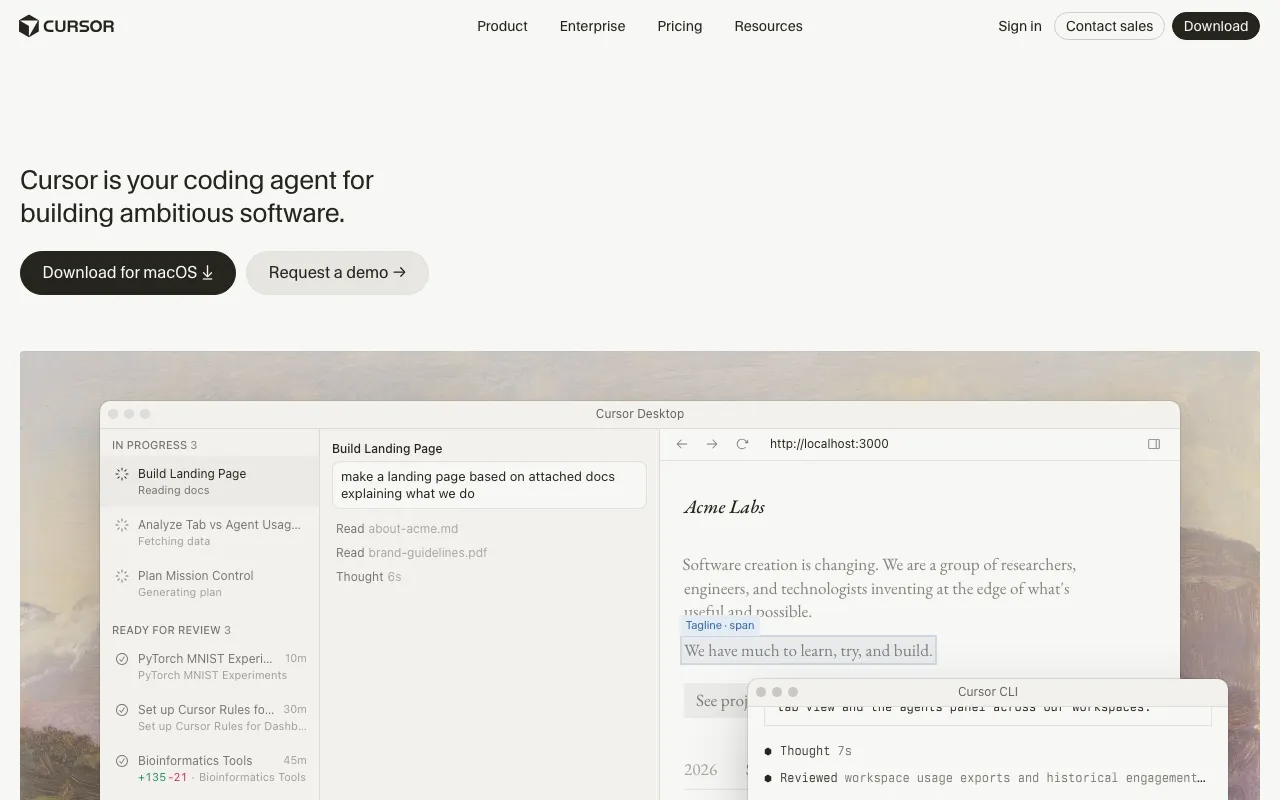
What is Cursor?
Cursor is a desktop code editor built on VS Code that replaces the traditional write-compile-debug loop with an agentic workflow: you describe a feature, the AI writes code across multiple files, runs the tests, fixes failures, and hands back a diff for you to approve. It ships with a proprietary Tab autocomplete model trained specifically for next-action prediction — not just token completion — and codebase-wide semantic search that lets the agent understand the full project context regardless of size.
Unlike tools that bolt a chat window onto an existing editor, Cursor’s AI is embedded into the edit, terminal, and review surfaces. Cloud agents run asynchronously in the background while you work on something else. On the Teams plan, Bugbot reviews pull requests autonomously. The editor supports multiple frontier models simultaneously (Claude Sonnet, GPT-4o, Gemini, and others), and the credit-pool billing model means every dollar of subscription spend goes toward actual model usage rather than a seat-access fee.
Who is it for?
Cursor targets developers who are spending a meaningful portion of their day on code generation and want that generation to happen inside their normal editor rather than through a browser chat interface. The free Hobby tier is enough for occasional use or evaluation, but the tool’s real value surfaces when running multi-file agents on real codebases — which requires at least the Pro plan.
- Full-stack freelancers and solo developers who ship features end-to-end and want to use AI for the boilerplate-heavy parts (tests, migrations, API clients) while staying in control of architecture decisions.
- Engineering teams (5–50 developers) that want shared AI context, centralized billing, and automated PR review via Bugbot without adopting a separate code-review tool.
- Developers already on VS Code who want to add agentic AI without migrating their extensions, keybindings, or settings.
- Power users running continuous background agents on large monorepos who need the higher credit pools of Pro+ ($60/month) or Ultra ($200/month) to avoid hitting limits mid-sprint.
How much does Cursor cost?
Starting price: $20/mo · Free tier: yes · Model: freemium
Price history tracked from June 2026
| Plan | Price | Includes |
|---|---|---|
| Hobby | Free | Limited Agent requests · Limited Tab completions · Full editor access · One-week Pro trial on signup |
| Pro | $20/mo | $20 monthly AI credit pool · Extended Agent request limits · Frontier models (Claude Sonnet, GPT-4o, Gemini) · MCPs, skills, hooks, cloud agents · Bugbot on usage-based billing |
| Pro+ | $60/mo | $60 monthly AI credit pool (3x Pro) · Same models and features as Pro · Designed for power users who exhaust Pro limits |
| Ultra | $200/mo | 20x usage credits vs Pro · Priority access to new features · For full-time AI-native development · Continuous background agents on large codebases |
| Teams | $40/user/mo | Centralized billing and administration · Team marketplace for rules, skills, plugins · Agentic code reviews with Bugbot · Shared team context for cloud agents · Usage analytics and team-wide privacy mode · SAML/OIDC SSO |
| Enterprise | Custom | Pooled usage across seats · Invoice/PO billing and SCIM seat management · Repository, model, and MCP access controls · Audit logs, service accounts, AI code tracking API · Priority support and account management |
What are Cursor's key features?
- Agentic mode — AI builds, tests, and demos features end-to-end for developer approval
- Tab autocomplete with a proprietary model trained for next-action prediction
- Codebase-aware semantic search regardless of repo scale
- Multi-model support: OpenAI, Anthropic, Google, xAI, and Cursor-native models
- MCP (Model Context Protocol) integration for external tool access
- Cloud agents that run asynchronously in the background
- Bugbot for agentic pull-request code review (Teams and above)
- Slack and GitHub integrations for in-workflow AI access
What people use Cursor for
- 01 Delegating a full feature build to an AI agent while reviewing the output rather than writing every line
- 02 Tab-autocomplete for boilerplate-heavy tasks like writing tests, migrations, or config files
- 03 Semantic codebase search across large monorepos to answer questions before editing
- 04 Automated code review via Bugbot on pull requests (Teams plan)
- 05 Multi-model access in a single editor — switching between Claude, GPT-4o, and Gemini per task
Pros and cons
| Pros | Cons |
|---|---|
| Built on VS Code — existing extensions, keybindings, and settings transfer directly | Ultra at $200/month is expensive for occasional users; Pro credit pool can run out mid-month on heavy agentic tasks |
| Free tier requires no credit card and includes a one-week Pro trial | Agentic runs require careful review — autonomous edits can introduce subtle bugs across many files at once |
| Single editor handles autocomplete, chat, agents, and code review without plugin juggling | No web-based IDE; desktop install required (macOS, Windows, Linux) |
| Annual billing cuts 20% off every paid plan | Teams plan at $40/user/month adds up quickly for larger engineering orgs versus per-seat alternatives |
What are the best Cursor alternatives?
GitHub Copilot is the closest Cursor alternative in our directory: it covers the same category (AI Coding), starts at $10/mo, has a free tier.
Ranked by category overlap with Cursor, then free-tier availability, then lowest verified starting price — computed from our verified data, never from sponsorships.
| Alternative | What it is | Starting price | Free tier | Price verified |
|---|---|---|---|---|
| GitHub Copilot vs Cursor → | AI coding assistant with inline completions, chat, and autonomous agent mode across major IDEs | $10/mo | yes | Jul 3, 2026 |
| Windsurf vs Cursor → | Agentic AI IDE with Cascade that writes, edits and runs code autonomously inside your editor | $15/mo | yes | Jun 11, 2026 |
| Claude vs Cursor → | Anthropic's AI assistant built for long-context analysis, coding, and safe reasoning | $20/mo | yes | Jul 3, 2026 |
| Bolt.new vs Cursor → | AI-powered web development platform that builds full-stack apps from a chat prompt | $25/mo | yes | Jul 3, 2026 |
| Gemini | Google's multimodal AI assistant with real-time Search access and deep Workspace integration | $7.99/mo | yes | Jun 11, 2026 |
| ChatGPT | Conversational AI assistant by OpenAI with multimodal reasoning, voice, and agent capabilities | $8/mo | yes | Jun 11, 2026 |
Head-to-head comparisons
- Cursor vs Aider — full comparison →
- Cursor vs Amazon Q Developer — full comparison →
- Cursor vs Google Antigravity — full comparison →
- Cursor vs Bolt.new — full comparison →
- Cursor vs Claude — full comparison →
- Cursor vs GitHub Copilot — full comparison →
- Cursor vs Kiro — full comparison →
- Cursor vs Windsurf — full comparison →
How people make money with Cursor
- Freelance AI-accelerated development on Upwork or Toptal — developers using Cursor report shipping features 2-4x faster, enabling higher project throughput at the same hourly rate
- Offer Cursor workflow setup and team onboarding as a consulting service — the Teams plan gives a natural upsell path for small dev shops
Frequently asked questions
Is Cursor free?
Yes. The Hobby tier is permanently free with no credit card required. It includes limited Agent requests and Tab completions, plus a one-week Pro trial when you first sign up.
What is the difference between Cursor Pro and Pro+?
Both tiers access the same frontier models and features. The only difference is usage volume: Pro includes a $20/month AI credit pool and Pro+ provides 3x that at $60/month. Pro+ is designed for developers who regularly exhaust Pro credits before month-end.
How much does Cursor Ultra cost?
Cursor Ultra costs $200/month. It provides 20x the AI usage credits of the Pro plan and priority access to new features. It targets developers running continuous background agents on large codebases.
Does Cursor work with Claude and GPT-4o?
Yes. Cursor supports multiple frontier models simultaneously, including Anthropic Claude Sonnet, OpenAI GPT-4o, Google Gemini, and xAI models. You can switch models per conversation or task.
Is Cursor just a VS Code fork?
Cursor is built on top of VS Code, so it shares the same extension marketplace, keybindings, and UI. The differences are the AI-native features: agentic coding, codebase-wide semantic search, and the proprietary Tab autocomplete model.
Does Cursor have a Teams plan?
Yes. Teams costs $40 per user per month and adds centralized billing, SAML/OIDC SSO, team-wide privacy mode, shared agent context, and Bugbot for automated pull-request review.
Can Cursor run agents autonomously?
Yes. In agentic mode, Cursor can write code, run tests, fix failing tests, and demo a feature end-to-end without step-by-step prompting. Cloud agents run asynchronously in the background on Pro and above.