Lovart
AI design agent that turns one prompt into full brand kits, posters, and videos by orchestrating multiple image and video models
Lovart bills itself as the first AI design agent: describe a brief and it orchestrates image and video models to output full sets — logos, posters, brand kits, storyboards — on one canvas. Launched globally in July 2025, it runs on credits, with a free tier of 100 credits daily and paid plans from roughly $19.90 to about $160 per month. Powerful for volume, but credit-metered and output still needs human polish.
What is Lovart?
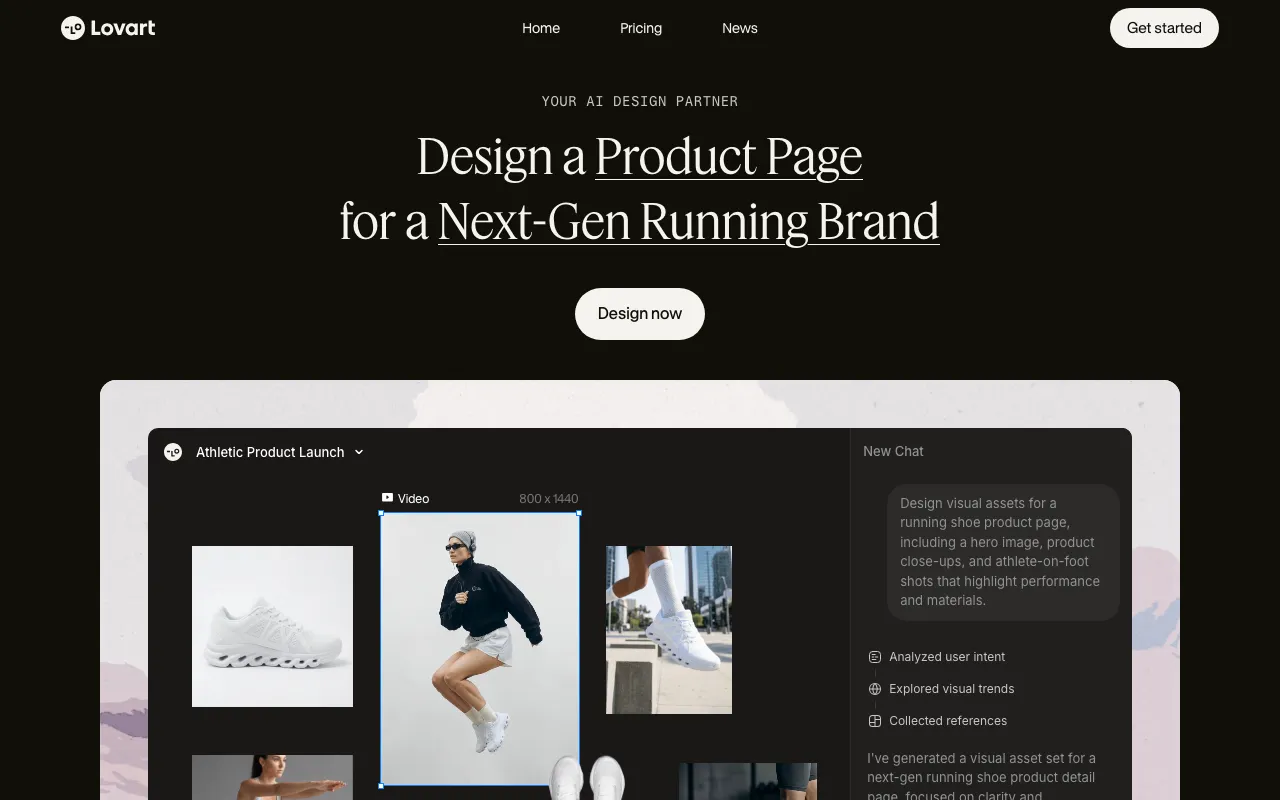
Lovart markets itself as the world’s first AI design agent. Instead of handing you a blank template, you give it a brief — “a summer product launch kit for a coffee brand,” say — and it plans the job, then generates and arranges a full set of deliverables on an infinite canvas: logos, posters, social sets, packaging mockups, storyboards, and short videos. The distinguishing idea is orchestration. Rather than being one image model, Lovart routes each part of a request across multiple leading third-party image and video engines and stitches the results into something that reads as one coherent campaign.
Under the hood, a reasoning layer interprets the brief and decides which models and styles to use, then batches generation — reportedly up to around 40 assets in a single run. Integrated video models (including engines such as Veo and Seedance) extend the same workflow to short-form motion, and outputs export to formats you can finish in editors like Figma or Photoshop. Lovart runs on a credit system: a free tier refreshes roughly 100 credits daily with no credit card, and paid plans add larger monthly credit pools, commercial licensing, and higher output quality. It exited its invite-only beta and launched globally in July 2025.
Who is it for?
Lovart fits people who need a volume of on-brand visual assets faster than a manual design cycle allows, and who are comfortable treating AI output as a strong first draft to polish rather than a finished file. The free tier is generous enough to evaluate the workflow, but commercial work and heavier output require a paid plan — and because pricing is credit-metered, the real cost depends on how much you generate.
- Solo founders and early-stage startups who need a whole brand kit and launch assets without hiring a designer or agency.
- Freelancers and small studios producing recurring social-media sets, ad creative, and pitch visuals for multiple clients.
- Marketers and content creators who want batches of consistent posts, banners, and short videos generated from one brief.
- Small agencies exploring agentic production to speed up concepting, while still finishing precise edits in tools like Adobe Firefly or a vector editor like Recraft.
How much does Lovart cost?
Starting price: $19.90/mo · Free tier: yes · Model: freemium
Price history tracked from June 2026
| Plan | Price | Includes |
|---|---|---|
| Free | Free | ~100 credits that refresh daily · No credit card required, no time limit · Full web canvas and model access · Personal use only — no commercial license |
| Starter | $19.90/mo | ~1,500-2,000 monthly credits (approx.) · Standard quality and core styles · Priority over free-tier queue · Entry paid tier for solo creators |
| Basic | ~$39.90/mo | ~3,500-4,600 monthly credits (approx.) · HD quality and advanced styles · Commercial license included · For freelancers shipping client work |
| Pro | ~$89.90/mo | ~11,000 monthly credits (approx.) · Priority processing and premium models · Team seats and collaboration · Positioned as agency-grade output under $90/mo |
| Ultimate | ~$159.99/mo | ~22,000-30,000 monthly credits (approx.) · 4K exports and custom styles · API access and 10+ seats (per third-party listings) · For high-volume studios and agencies |
What are Lovart's key features?
- Agentic design canvas that interprets a brief, then plans, generates, and arranges assets automatically
- Orchestrates multiple third-party image and video models (including video engines such as Veo and Seedance) behind one prompt
- Batch generation of dozens of assets in a single run (reported up to ~40)
- Infinite canvas for iterating, editing, and organizing a whole campaign in one place
- Brand-kit generation covering logos, palettes, and type systems
- Exports compatible with downstream editors like Figma and Photoshop
- Short-form video generation via integrated video models
What people use Lovart for
- 01 Generating a full brand kit — logo, color system, typography, and mockups — from a single prompt
- 02 Producing a batch of on-brand social posts, ads, and banners in one canvas session
- 03 Storyboarding and creating short marketing videos through orchestrated video models
- 04 Rapid concept exploration and moodboards for client pitches before committing to a direction
- 05 Turning a product description into packaging, poster, and UI mockups at once
Pros and cons
| Pros | Cons |
|---|---|
| Produces a full multi-format deliverable set from one brief, not just isolated images | Credit-based pricing is opaque and burns fast — complex jobs consume large credit chunks, and unused monthly credits do not roll over |
| Permanent free tier with ~100 credits daily and no credit card required | Third-party price figures vary widely (entry paid tiers reported near $19.90/mo, Pro near $90/mo) and the official pricing page could not be fetched directly, so exact numbers should be confirmed on the site |
| Orchestrates many leading image and video models without juggling separate tools | Agent output needs human polish; precise edits often have to be finished in Photoshop or Figma |
| Infinite canvas keeps an entire campaign's assets visually consistent in one workspace | Free plan grants personal-use rights only — commercial licensing requires a paid plan |
| Relatively new (global launch mid-2025), with some reported account-downgrade and peak-time performance complaints |
What are the best Lovart alternatives?
Microsoft Designer is the closest Lovart alternative in our directory: it covers the same category (AI Design), starts at $0, has a free tier.
Ranked by category overlap with Lovart, then free-tier availability, then lowest verified starting price — computed from our verified data, never from sponsorships.
| Alternative | What it is | Starting price | Free tier | Price verified |
|---|---|---|---|---|
| Microsoft Designer | Free AI graphic design app for images, social posts, stickers, and edits from text prompts, powered by DALL-E 3 | $0 | yes | Jun 24, 2026 |
| Recraft | AI image and vector generator with custom styles, mockups, and design-ready output | $10/mo | yes | Jul 3, 2026 |
| Canva | AI-powered design platform with templates, image generation, and Magic Studio tools | $15/mo | yes | Jun 11, 2026 |
| Gamma | AI presentation and document builder that generates slides, docs and web pages from a prompt | $9/mo | yes | Aug 27, 2026 |
| Adobe Firefly | Commercially safe AI image generator trained on licensed content with Creative Cloud integration | $9.99/mo | yes | Aug 27, 2026 |
How people make money with Lovart
- Offer fast-turnaround brand-kit and social-media-set packages to small businesses on freelance marketplaces — generate the logo, palette, and post templates in one Lovart session, then polish in Figma or Photoshop before delivery
- Run a recurring social-content service producing weekly poster and ad-creative batches for local clients, using the shared canvas to keep a consistent visual style across each campaign
- Bundle Lovart-generated storyboards and short promo videos into pitch decks for agencies that need concept visuals faster than a manual design cycle
Frequently asked questions
Is Lovart free?
Yes. Lovart has a permanent free tier that grants roughly 100 credits that refresh daily, with no credit card and no time limit. However, free-plan designs are for personal use only — commercial rights require a paid plan.
Is Lovart generally available or still invite-only?
It is generally available. Lovart launched globally on July 23, 2025, exiting its earlier invite/waitlist beta, and now offers free and paid plans that anyone can sign up for through the web app.
How does Lovart's pricing work?
Pricing is credit-based. A free tier gives daily-refreshing credits, and paid plans (commonly Starter, Basic, Pro, and Ultimate) provide larger monthly credit pools. Credits are spent per generation based on model and complexity, and unused monthly credits do not roll over. Exact prices and credit counts vary by promotion, so confirm current figures on the official pricing page.
Can I use Lovart designs commercially?
Commercial use requires a paid plan. Paid tiers such as Basic, Pro, and Ultimate include a commercial license for generated assets, while free-plan output is limited to personal use.
What AI models does Lovart use?
Lovart is an orchestration layer rather than a single model. It routes prompts across multiple leading third-party image and video engines (including video models such as Veo and Seedance) and coordinates them with its own reasoning engine to produce a coherent set of assets.
Does Lovart have an API?
Most people use Lovart through its web canvas. Some third-party listings note API access on the top Ultimate plan, but there is no widely documented public developer API, so treat API access as an enterprise/top-tier feature to verify with Lovart.
How is Lovart different from Canva?
Canva is primarily a template-based editor where you assemble designs yourself. Lovart is an agent that generates a full set of assets from a written brief by orchestrating multiple AI models, then lets you refine them on an infinite canvas. Lovart favors generation and volume; Canva favors manual control and templates.