Sunsama
Daily planner that pulls tasks from Todoist, Asana, Jira, and Slack into a guided planning ritual with calendar timeboxing and AI time estimates
Sunsama is a daily planner that pulls tasks from Todoist, Asana, Jira, Trello, Gmail, and Slack into a guided planning ritual with calendar timeboxing. There is no free tier — one Pro plan costs $17/month billed yearly or $22/month monthly after a 14-day trial. Its AI auto-estimates task times and tags channels, but the core value is the manual planning discipline. Best for professionals fighting overwork.
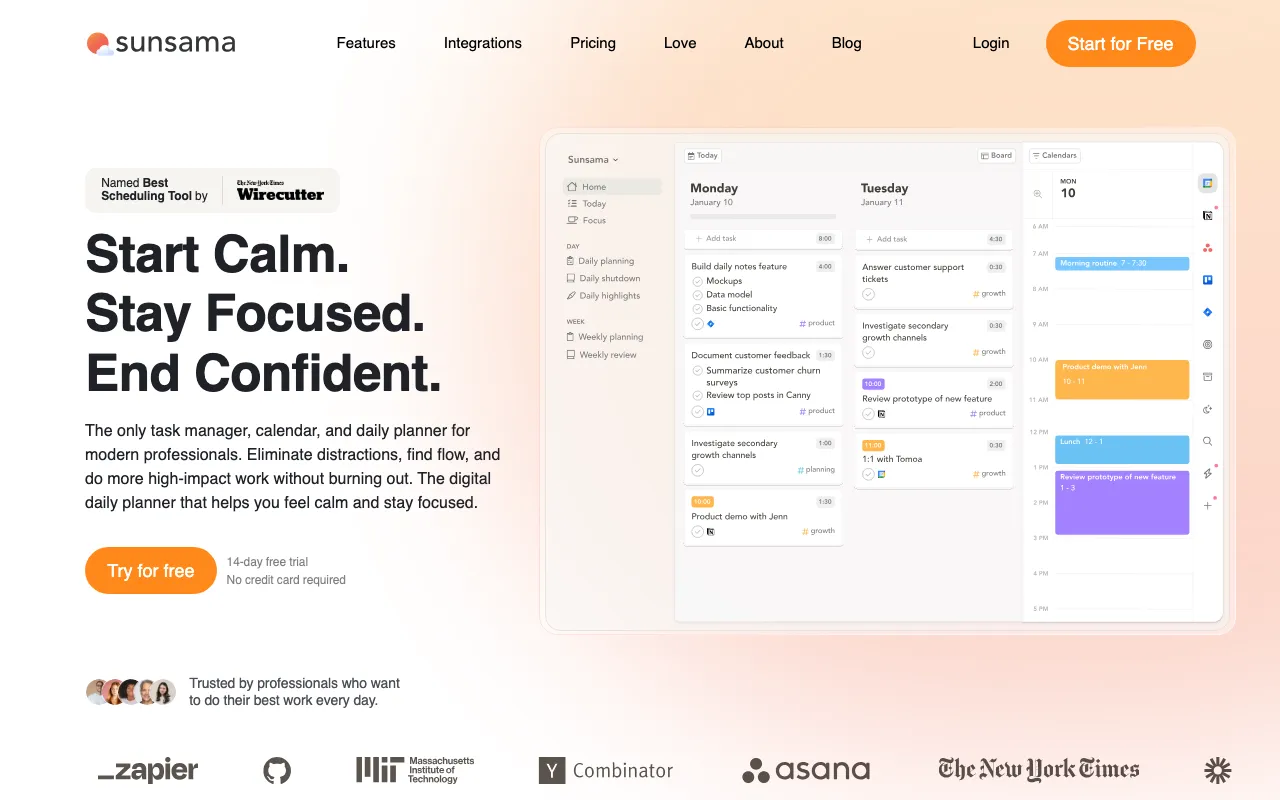
What is Sunsama?
Sunsama is a daily planning app that sits between your calendar and your task tools. Instead of storing to-dos, it pulls tasks and commitments from the apps you already use — Todoist, Asana, Jira, Trello, ClickUp, Linear, GitHub, Notion, Gmail, Outlook, and Slack — and walks you through a guided morning ritual where you choose what to work on today, order it, and timebox it directly onto your calendar. As you plan, Sunsama sums your estimated times against a workload threshold and warns you when you have committed to more than a realistic day. An end-of-day shutdown ritual then closes the loop, letting you review what you finished and roll over what you did not.
The AI layer is deliberately light. Sunsama assigns predicted time estimates to new tasks and automatically tags them into the right channels based on your past work in the tool, and those suggestions sharpen the more you use it. Pro-tier accounts also expose MCP and Zapier connections so AI assistants and 9,000-plus other apps can plug in. But Sunsama does not auto-schedule or reshuffle your day the way an autopilot scheduler would — the planning decisions stay with you. There is no free-forever plan; after a 14-day trial the single Pro plan costs $17 per person per month billed yearly or $22 billed monthly, with custom Enterprise pricing for teams needing SSO and security controls.
Who is it for?
Sunsama fits people who feel scattered across multiple task apps and want a calm, repeatable way to decide what actually gets done each day, rather than software that plans for them. Its value comes from the discipline of the ritual, so it rewards users who will genuinely sit down to plan and shut down every workday; if you want hands-off automation or a free tool, the fit is weaker.
- Knowledge workers and managers juggling tasks across Jira, Asana, Slack, and email who need one place to plan and timebox the day.
- Freelancers and consultants who want to protect against overcommitment by seeing planned hours against a realistic daily capacity.
- Productivity-ritual enthusiasts who value a structured morning-planning and end-of-day shutdown practice over raw feature count.
- Anti-burnout professionals willing to pay $17–$22/month for work-life boundaries and are comfortable that AI here assists rather than automates.
How much does Sunsama cost?
Starting price: $17/mo · Free tier: no · Model: paid
Price history tracked from June 2026
| Plan | Price | Includes |
|---|---|---|
| Pro | $17/mo | $17/month per person billed yearly (about $204/year) · $22/month per person billed monthly · 14-day free trial, no credit card required · Unlimited tasks, integrations, and daily planning · AI time estimates, MCP, and Zapier automation · Guided daily planning, timeboxing, and shutdown rituals |
| Enterprise | Custom | Custom pricing via sales contact · SSO and SAML authentication · Custom security, compliance, and integration · Custom billing arrangements |
What are Sunsama's key features?
- Guided daily planning ritual that walks you through choosing and ordering the day's tasks
- Calendar timeboxing — drag tasks onto your calendar to block specific work windows
- Two-way integrations with Todoist, Asana, Jira, Trello, ClickUp, Linear, GitHub, Notion, Gmail, Outlook, and Slack
- AI time estimates and automatic channel tagging based on your past work in Sunsama
- Daily shutdown ritual and end-of-day review
- Focus mode with task muting and a built-in Pomodoro timer
- Weekly objectives, workload thresholds, and time analytics
- MCP and Zapier support for connecting AI assistants and 9,000+ apps
What people use Sunsama for
- 01 Running a structured morning planning ritual to decide what to actually work on each day
- 02 Timeboxing tasks directly onto a calendar to get a realistic view of a workday's capacity
- 03 Consolidating tasks scattered across Todoist, Asana, Jira, Trello, Gmail, and Slack into one planning surface
- 04 Ending the day with a shutdown ritual to review completed work and reduce after-hours overthinking
- 05 Tracking planned versus actual time to spot overcommitment against a weekly workload threshold
Pros and cons
| Pros | Cons |
|---|---|
| Genuinely unified planner — pulls tasks from many tools into one calendar-plus-task view | No permanent free tier — the company states it has no free-forever plan, so it is trial-then-pay only |
| The guided ritual builds a repeatable daily planning habit rather than just storing tasks | A single $17–$22/month price point is steep for what is fundamentally a daily planner |
| 14-day free trial with no credit card required, and annual billing drops the price to $17/month | AI is a secondary layer (time estimates and tagging); it does not auto-schedule your day like Motion or Reclaim |
| Named 'Best Scheduling Tool' by NYT Wirecutter, with broad integration coverage | The manual planning ritual has a learning curve and only pays off if you commit to it daily |
What are the best Sunsama alternatives?
Taskade is the closest Sunsama alternative in our directory: it covers the same category (AI Productivity), starts at $6/mo, has a free tier.
Ranked by category overlap with Sunsama, then free-tier availability, then lowest verified starting price — computed from our verified data, never from sponsorships.
| Alternative | What it is | Starting price | Free tier | Price verified |
|---|---|---|---|---|
| Taskade | All-in-one AI workspace combining tasks, notes, mind maps, and docs with custom AI agents and automations | $6/mo | yes | Jun 28, 2026 |
| ClickUp | All-in-one work platform whose ClickUp Brain AI layer is sold separately as a per-user add-on | $7/user/mo | yes | Jul 16, 2026 |
| Notion | AI workspace combining docs, databases, projects, and autonomous agents in one platform | $10/member/mo | yes | Aug 27, 2026 |
| Reclaim | AI calendar that auto-schedules tasks, habits, and meetings on Google Calendar or Outlook, defending focus time and finding meeting slots | $10/seat/mo | yes | Jun 30, 2026 |
| Motion | AI calendar and project manager that auto-schedules tasks and runs AI meeting notes | $19/seat/mo | no | Jun 21, 2026 |
Frequently asked questions
Does Sunsama have a free plan?
No. Sunsama has no free-forever tier and states it does not plan to add one. You get a 14-day free trial with no credit card required, and after that the single Pro plan costs $17/month billed yearly or $22/month billed monthly. Enterprise pricing is custom.
How much does Sunsama cost in 2026?
Sunsama has one Pro plan: $17 per person per month billed yearly (about $204/year), or $22 per person per month billed monthly. Enterprise plans with SSO and custom security are priced on request. There is a 14-day free trial that requires no credit card.
Does Sunsama use AI to plan my day?
Only partly. Sunsama's AI suggests task time estimates and auto-tags tasks into channels based on your past work, but it does not auto-schedule your calendar. The core experience is a manual, guided planning ritual where you decide and timebox your own tasks. AI is a helper, not an autopilot.
What tools does Sunsama integrate with?
Sunsama connects with Todoist, Asana, Jira, Trello, ClickUp, Linear, GitHub, and Notion for tasks; Gmail, Outlook, Slack, and Microsoft Teams for messages; and Google, Outlook, and Apple calendars. It also supports Zapier for 9,000+ more apps and MCP for AI assistants.
How is Sunsama different from Motion or Reclaim?
Motion and Reclaim automatically schedule and reshuffle your tasks with AI. Sunsama takes the opposite approach: it guides you through planning and timeboxing your day by hand, then adds light AI for time estimates. Choose Sunsama for a mindful daily ritual, Motion or Reclaim for hands-off automation.
What platforms does Sunsama run on?
Sunsama runs on the web plus dedicated desktop apps for macOS, Windows, and Linux, and mobile apps for iOS and Android. Your plan, tasks, and calendar sync across all of them. There is no permanent free tier, so access requires an active trial or paid subscription.